Justification
There is something Zen about boot time optimization. Let's face it, most of us don't reboot our Linux machines all that often. Yet shaving off a second or two from boot process gives me certain type of satisfaction.Recent post on Google+ by Lukáš Zapletal made me try out bootchart for the first time. Original post was about e4rat - a tool for defragmenting ext4 partitions to optimize them for boot speed when using traditional rotational media. I decided to have a look at my bootcharts and see what can be done on my SSD based Gentoo system.
Bootchart Installation
I am not going to go into details. Just install from your distribution repositories. Gentoo contains app-benchmarks/bootchart2 in base portage tree, and Gentoo wiki has all the instructions you'll need.First run
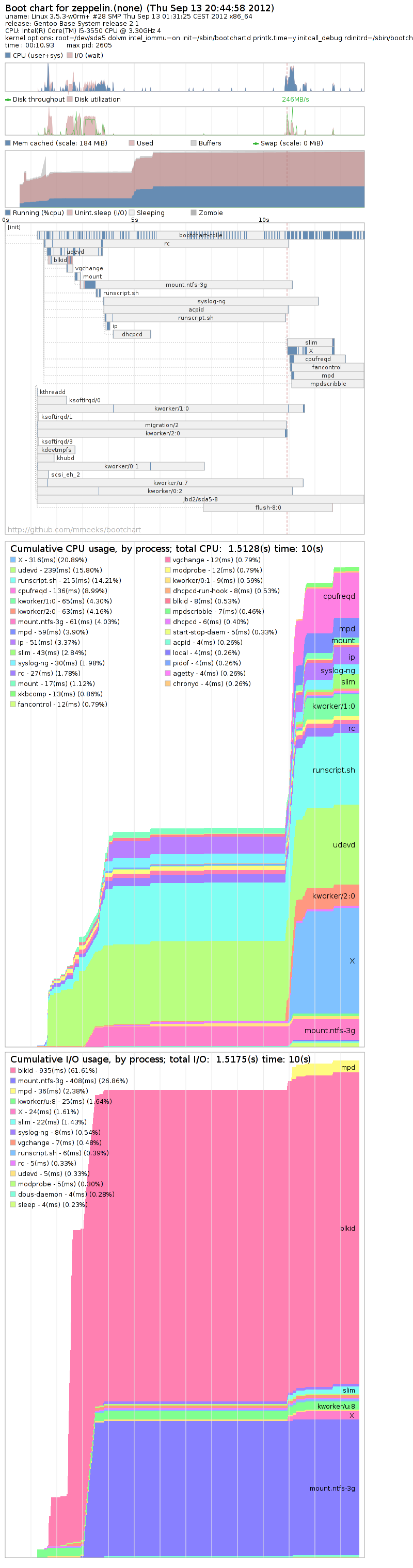
After I installed bootchart, my initial result was 11 seconds from init to X server running and showing password prompt. Let's analyze the Bootchart (200kB png) a little bit. It looks like slim was waiting for runscript.sh to finish. Not visible in the image, but that is actually net.eth0 script. In other words: network configuration, dhcp. Since I have stable IP address in my local network, I decided to stop using DHCP. For a simple Gentoo system this can be achieved by editing /etc/conf.d/net (configuring IPv4 and IPv6 statically):
$ cat /etc/conf.d/net
config_eth0="A.B.C.D/24 2001:470:413b:0:2e2:d4ff:ff8d:ccd1/64"
routes_eth0="default via A.B.C.1"
So how are we faring after making our IP static? 5
seconds! At this point I'd be willing to say mission
accomplished, but something told me there's more to do...
Let the fun begin
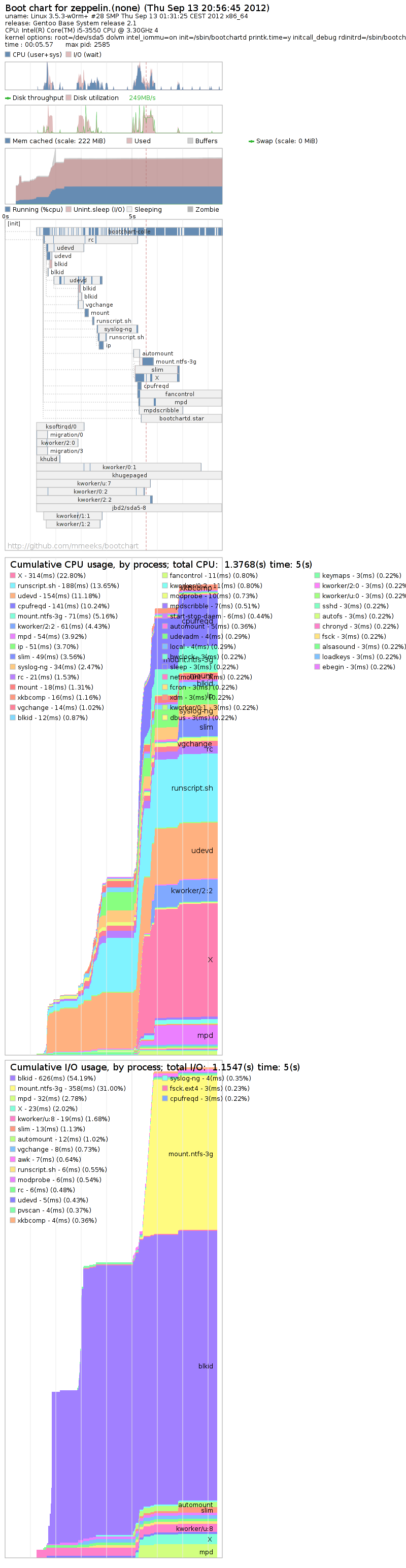
Looking at the second bootchart tells us one thing: xdm/slim is waiting for my ntfs partition to get mounted. We should probably avoid that!What I decided to try was installing autofs and just mounting my /shared-data partition when it's actually accessed. To my dismay, the resulting bootchart showed that the boot got even slower! (5.6 seconds). Time for the big guns baby!
Mini-optimizations
The problem with XDM seems to be that it is waiting for something. Let's have a look at /etc/init.d/xdm snippet:
depend() {
need localmount xdm-setup
# this should start as early as possible
# we can't do 'before *' as that breaks it
# (#139824) Start after ypbind and autofs for network authentication
# (#145219 #180163) Could use lirc mouse as input device
# (#70689 comment #92) Start after consolefont to avoid display corruption
# (#291269) Start after quota, since some dm need readable home
# (#390609) gdm-3 will fail when dbus is not running
# (#366753) starting keymaps after X causes problems
after bootmisc consolefont modules netmount
after readahead-list ypbind autofs openvpn gpm lircmd
after quota keymaps
before alsasound
# Start before X
use consolekit dbus xfs
}
XDM seems to have a lot of dependencies. It is understandable
because distributions will always prefer correctness over speed
(hopefully).
We are running a simple desktop. No network authentication, no
heavyweight display manager or desktop environment like KDE or
GNOME. So what happends if we remove netmount and autofs from
requirements of xdm? After all we don't need them to start
slim. Final
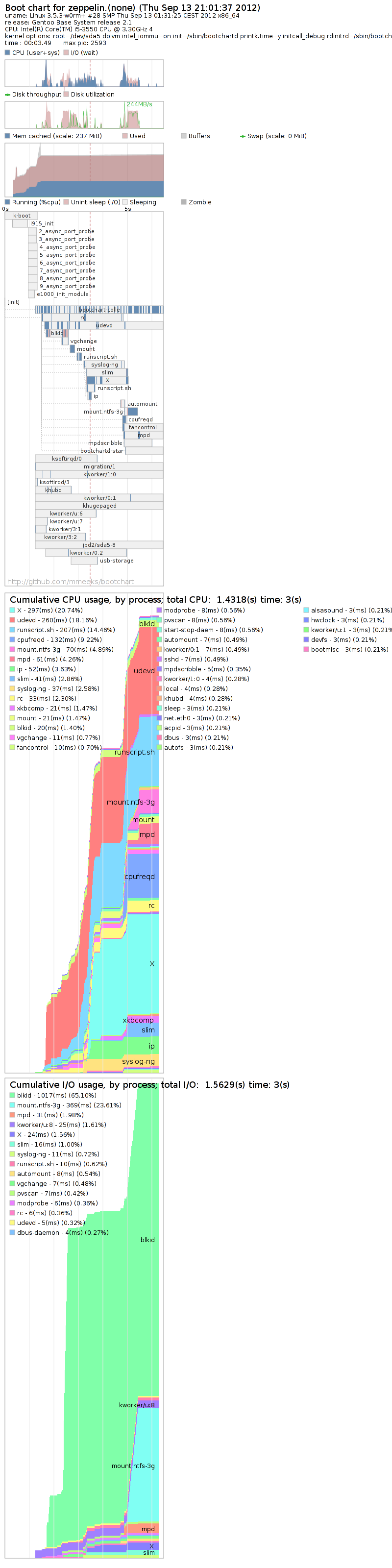
bootchart is much more interesting. Roughly 3.5-4 seconds from
init to X!
Quo Vadis
I finished with that 3.5-4 second boot. But as the final bootchart shows there's still room for improvement. List of things that could probably be looked into:- blkid takes too long. Perhaps we could avoid it completely?
- e1000 (network card) and i915 (graphics card) take quite a while to initialize. Perhaps having e1000e as module and loading it later during boot would be faster
- Not using LVM would speed things up, but I like its advantages
- Avoiding udev could be useful as well for static system where no USB devices are to be attached dynamically
- While we are at it, disabling USB completely would save around 250ms as well
Gentoo Boot Optimization
$ virt-install -n test -r 1024 --cdrom BT5R1-KDE-64.iso \
--boot cdrom --nonetworks --graphics spice \
--disk path=/dev/sdg
Where BT5R1-KDE-64.iso would be my BackTrack iso image
and /dev/sdg would be my USB drive. Sadly this failed
with ugly error message after BackTrack started booting:
# (initramfs) mount: mounting dev/loop0 on //filesystem.squashfs failed
$ virt-install -n test -r 1024 --cdrom BT5R1-KDE-64.iso \
--boot cdrom --nonetworks --graphics spice \
--disk path=/dev/sdg,bus=virtio
After that I just continued according to the
how-to
with a few differences (such as USB key being seen as
/dev/vda). Welcome our encypted overlords.
Installing BackTrack on USB: mounting dev/loop0 failed
DevConf 2012 - "How I Have Seen the Future"
Auto-tag Fedora package git repo from koji builds
#!/bin/bash
giturl=`fedpkg giturl`
if [ $? -ne 0 ];then
echo "This doesn't look like fedora package directory"
exit 1
fi
pkgname=`echo "${giturl}" |\
sed -e 's|git://pkgs.fedoraproject.org/\(.*\)?.*|\1|'`
# make sure we are up-to-date
git fetch
# go through last 3 releases (incl. rawhide)
for dist in f15 f16 f17;do
builds=`koji list-tagged "${dist}" "${pkgname}" | \
grep "${pkgname}" | awk '{print $1}'`
for build in $builds;do
# task urls sometimes have ".git" suffix
git_sha=`koji buildinfo "${build}" | grep '^Task:' | \
sed -e "s|.*${pkgname}\(\.git\)*:\(.*\))|\2|"`
version=`echo $build | sed -e "s:${pkgname}-::"`
echo BUILD: $pkgname\($version\) = $git_sha
git tag "${version}" "${git_sha}"
done
done
Enjoy!
Auto-tag Fedora package git repo from koji builds
- Bugzilla integration
- Mock integration
- JSON api for external plugins (more info further down)
- Several automated tests
Package Review
==============
Key:
- = N/A
x = Check
! = Problem
? = Not evaluated
==== Generic ====
...
[ ]: MUST License field in the package spec file matches the actual license.
[ ]: MUST License file installed when any subpackage combination is installed.
[!]: MUST Package consistently uses macros (instead of hard-coded directory names).
Using both %{buildroot} and $RPM_BUILD_ROOT
...
[x]: SHOULD Spec use %global instead of %define.
...
==== Java ====
[!]: MUST If package uses "-Dmaven.local.depmap" explain why it was needed in a comment
[!]: MUST If package uses "-Dmaven.test.skip=true" explain why it was needed in a comment
Issues:
[!]: MUST Package consistently uses macros (instead of hard-coded directory names).
Using both %{buildroot} and $RPM_BUILD_ROOT
[!]: MUST If package uses "-Dmaven.local.depmap" explain why it was needed in a comment
[!]: MUST If package uses "-Dmaven.test.skip=true" explain why it was needed in a comment
JSON API
- Programming language has to have JSON format support
{
"supported_api": 1,
"pkgname": "package name",
"version": "package version",
"release": "package release",
"srpm":"path/to/srpm",
"spec":{ path: "path/to/spec",
"text": "spec text with expanded macros"},
"rpms":[ "path/to/rpm", ...],
"rpmlint": "rpmlint output",
"build_dir": "/path/to/src/directory/after/build"
}
When your plugin is done with checks it returns following message by
writing it to stdout:
{
"command": "results",
"supported_api": 1,
"checks":
[
{
"name": "CheckName",
"url": "URL to guidelines usually",
"group": "Group for this test.(Java, Perl, etc.)",
"text": "Check description that shows on review template",
"deprecates":["DeprecatedTest", ...]
"type": "MUST"|"SHOULD",
"result": "pass"|"fail"|"inconclusive",
"extra_output": "text",
},
...
]
}
If the plugin closes stdout without writing anything there, it means
there were no relevant automated tests to run and no non-automated
tests to include in template for manual evaluation. This is useful
so we don't include for example Perl-related test output for Java
packages and vice-versa.
Roadmap
While the tool is already usable and soon to be packaged in Fedora, there are still quite a few things we want to improve:- Add more functions to API (currently there is just get_section)
- Automate all automatable tests currently available
- Get rid of redundant tests (don't duplicate rpmlint)
- Add more tests of course!
- Maybe add templating support?
fedora-review - Package reviews made easier
I am a software chef. I create recipes and prepare them.
- Package maintainers - chefs
- QE/QA - tasters
- Security - bouncers
- Release engineering - waiters (sorry guys)
My job: I am a software chef
...
%package javadoc
Summary: API documentation for %{name}
Group: Documentation
Requires: jpackage-utils
%description javadoc
%{summary}.
...
%install
...
# javadoc
install -d -m 755 %{buildroot}%{_javadocdir}/%{name}
cp -pr target/site/apidocs/* %{buildroot}%{_javadocdir}/%{name}
...
%files javadoc
%doc LICENSE
%doc %{_javadocdir}/%{name}
...
- Copying of files needs to be done during install phase
- If package contains license, javadoc has to have it too
# %create_javadoc_subpackage can be used to completely create # javadoc subpackage for java projects. # !!! Needs to be used at the end of %install section # There are these variables that change its behaviour: # # %__javadoc_license - set if the license is in non-standard place to # prevent Requires on main package # %__apidocs_dir - set custom path to directory with javadocs # (defaults to target/site/apidocs) # %__javadoc_skip_requires - if defined javadoc subpackage will not # require main package under any circumstances (useful # if upstream doesn't provide separate license file) #Is it understandable enough? If you need to generate javadocs, just make them build and then add %create_javadoc_subpackage macro call at the end of %install section. Normally you shouldn't have to change anything. We search in a few standard places for licenses. More specifically we look for LICENSE* COPYING* doc/LICENSE* doc/COPYING* license*. Do you have more ideas where to look? It's easy to add. If we don't find license we automatically add requires on main package and assume you put license in there. If upstream doesn't provide separate license file you can do %global __javadoc_skip_requires t and we will ignore licensing completely.
Automatic javadoc subpackage generation
I wanna spend my life with you
So we make love on the grass under the moon
No one call tell, damned if I do
Forever journey on golden avenues
I drift in your eyes since I love you
I got that beat in my veins for only rule
Love is to share, mine is for you
Understood and agreed with
Maven dependency mapping macros
Thing I haven't blogged about yet but it's pretty important: We have new macros for maven depmaps in Fedora. In the past when you wanted to map certain groupId:artifactId to a file in _javadir, you had to include snippet like this in your spec:%add_to_maven_depmap com.google.guava guava 05 JPP guava %add_to_maven_depmap com.google.collections google-collections 05 JPP guavaThis tells our maven that com:google:guava:guava and com.google.collections:google-collections can be found in one of the repositories as JPP/guava.jar. It meant you had to know the groupId:artifactId and other information, plus it was extremely easy to make a mistake here causing all sorts of trouble. Current code doing the same thing:
%add_maven_depmap JPP-guava.pom guava.jar -a "com.google.collections:google-collections"We parse the pom file and get groupId:artifactId from it, plus we do additional sanity checks such as:
- naming of pom and jar file have to be consistent
- jar file has to exist if packaging type is not pom
Maven test deps skipping
Long story short: When you use -Dmaven.test.skip=true in Fedora packages you no longer need to patch those test dependencies out of pom.xml.We've had Apache Maven in Fedora for quite some time and packaging using Maven has been getting easier over time due to small tweaks to our packaging macros and guidelines changes. However there has been one problem that's been bugging all Java packagers and was especially confusing for those starting to package software built with Maven. The problem is that Maven creates a tree of dependencies before it starts building the project, but it includes test dependencies even when tests are being skipped.
Skipping tests is sometimes necessary due to problems with koji, or dependencies and up until now we had to either patch those tests dependencies from pom.xml or use custom dependency mappings (ugly concept in itself).
Last week I decided it's about time someone did something about this, so I dug in the Maven code and created a solution (more of a hack really) that is already included in Fedora. If you want the gory details, you can read the patch itself (I advise against it). I'll try to make the patch work properly so that it can be included in mainstream code.
I can just hope that packagers will find these changes helpful, but general feedback has been positive.
Making packaging Maven projects easier
If you have a changelog message like this:
* Mon Feb 28 2011 Stanislav Ochotnickyfedpkg commit -c would create git commit message like this:- 2.1.1-1 - Update to 2.1.1 - Update patch - Disable guice-eclipse for now
commit 22b5306036b6ef1022498b63e40324370ff7159b (HEAD, f15) Author: Stanislav OchotnickyThis works fine and mighty as long as you don't try to produce patch from this commit. Let's see what happens with git format-patch HEAD~1.AuthorDate: Fri Aug 26 11:45:54 2011 +0200 Update to 2.1.1 Update patch Disable guice-eclipse for now
$ head 0001-Update-to-2.1.1.patch f15 [22b5306] From 22b5306036b6ef1022498b63e40324370ff7159b Mon Sep 17 00:00:00 2001 From: Stanislav OchotnickyAfter adding this patch to repository using git am the line breaks would disappear. This is because git expects empty line after subject and description of the commit afterwards.Date: Fri, 26 Aug 2011 11:45:54 +0200 Subject: [PATCH] Update to 2.1.1 Update patch Disable guice-eclipse for now
I decided to try and fix fedpkg clog a bit. Given the previous changelog, now it creates git message like this:
commit 768964ce2145ef2b472fc5ef8781fb036d586b0e (HEAD, f15) Author: Stanislav OchotnickyThis means that git format-patch can do the right thing. I filed bug report for fedora-package so hopefully we can have this fixed sometime.AuthorDate: Fri Aug 26 11:57:20 2011 +0200 Update to 2.1.1 - Update patch - Disable guice-eclipse for now
Fixing fedpkg clog output to be git-friendly
Recently I was trying to help OpenSuSE guys with some updates to their Java stack and I was sent link to their build system. I noticed a file called jpackage-utils-rpmlintrc and this got me thinking...
What if we added rpmlint command to fedpkg with per-package rpmlint ignore settings? Turns out Pingou took my idea and implemented it in under an hour :-)
An example run:
$ fedpkg rpmlint plexus-interpolation.spec: W: invalid-url Source0: plexus-interpolation-1.14.tar.xz 0 packages and 1 specfiles checked; 0 errors, 1 warnings. plexus-interpolation.spec: W: invalid-url Source0: plexus-interpolation-1.14.tar.xz plexus-interpolation.src: W: spelling-error %description -l en_US interpolator -> interpolate, interpolation, interrogator plexus-interpolation.src: W: invalid-url Source0: plexus-interpolation-1.14.tar.xz 1 packages and 1 specfiles checked; 0 errors, 3 warnings. 2 packages run rpmlint has not been run on rpm files but shouldOK, so we can run rpmlint on spec, srpm and binary rpms with single command. But I don't like to see the same warnings all the time, because that means I will probably miss real problems when they appear. For this fedpkg rpmlint uses .rpmlint file as additional rpmlint config. So after creating:
$ cat > .rpmlint << EOF
# we have scm checkout with comment in spec
addFilter('invalid-url')
# false positive
addFilter('spelling-error.*interpolator')
EOF
$ fedpkg rpmlint
0 packages and 1 specfiles checked; 0 errors, 0 warnings.
1 packages and 1 specfiles checked; 0 errors, 0 warnings.
2 packages run
rpmlint has not been run on rpm files but should
Cool right? Pierre sent patch with this feature to fedpkg developers, so hopefully we'll see this addition soon. I then plan to add custom .rpmlint configurations to all my packages so that they will be warning-free.
Addition of fedpkg rpmlint
Name: jsoup
Version: 1.6.1
...
# http://jsoup.org/packages/jsoup-1.6.1-sources.jar
Source0: http://%{name}.org/packages/%{name}-%{version}-sources.jar
This creates burden on maintainers to keep those urls
up-to-date as version changes, so I created simple python script for
printing out Source urls from spec files:
#!/usr/bin/python
import rpm
import sys
ts=rpm.TransactionSet()
spec_obj = ts.parseSpec(sys.argv[1])
sources = spec_obj.sources
for url, num, flags in sources:
print url
Chmod this +x, put into your PATH and enjoy by giving it path to spec file.*Edit*: Probably much nicer way to do the same thing already present on your system (courtesy of Alexander Kurtakov):
spectool X.specI knew there was something like this, but forgot what it was. Oh well...2 minutes lost.
Print expanded SourceX: urls from spec files
FOSDEM 2011: Java Packaging for Developers - Video
You can play or download rest of the videos by going to Andrew's page.
FOSDEM 2011: Java Packaging for Developers - Video
Ant and Maven
Last time I have written about general rules of engagement for Java developers if they want to make lives of packagers easier. Today I'll focus on specifics of two main build systems in use today: Ant and Maven, but more so on Maven for reasons I'll state in a while.Ant
Ant is (or at least used to be) most widely deployed build system in Java ecosystem. There are probably multiple reasons for it, but generally it's because Ant is relatively simple. In *NIX world Ant is equivalent of pure make (and build.xml of Makefile). build.xml is just that: an XML, and it has additional extensions to simplify common tasks (calling javac, javadoc, etc.). So the question is:I am starting a new java project. How can I use Ant properly to make life easier for you?The most simple answer? DON'T! It might seem harsh and ignorant of bigger picture and it probably is. But I believe it's also true that Ant is generally harder to package than Maven. Ant build.xml files are almost always unique pieces of art in themselves and as such can be a pain to package. I am always reminded of following quote when I have to dig through some smart build.xml system:
Debugging is twice as hard as writing the code in the first place. Therefore, if you write the code as cleverly as possible, you are, by definition, not smart enough to debug it.And I have a feeling some people try to be really clever when writing their build.xml files. That said, I understand there are times when using Ant is just too tempting so I'll include a few tips for it anyway.
--Brian Kernighan
Use apache-ivy extension for dependencies
One of main problem with and is handling of various dependencies. Usually, they are in some subdirectory of main tree, some jars versioned, some not, some patched without any note about it...in other words nightmare in itself. Apache-ivy extension helps here because it works with dependency metadata that packagers can use to figure out real build dependencies including versions. We can also be sure that no dependencies are patched in one way or the other.
Ivy is nice for developers as well. It will make your source tarballs much smaller (You do have source tarballs right?!) and your build.xml nicer. I won't include any examples here because I believe that Ivy documentation is indeed very good.
One lib/ to rule them all
In case you really don't want to use Ivy, make sure you place all your dependencies in one directory in top level of your project (don't scatter your dependencies, even if you are using multiple sub-projects). This directory should ideally be called lib/. It should contain your dependencies named as ${name}-${version}.jar. Most of the time you should include license files for every dependency you bundle, because you are becoming distributors and for most licenses this means you have to provide full text of the license. For licenses use identical name as jar filenames, but use ".license" suffix. All in all, make it easy to figure out your build dependencies and play with them.Don't be too clever
I can't stress this enough. Try to keep your build.xml files to the bare minimum. Understanding ten 30 KiB big build.xml files with multiple-phase build and tests spread through 10 directories is no fun. Please think of poor packager when you write your build.xml files. I don't mind having grey hair that much, but I'd rather if it came later rather than sooner.Maven
And now we are coming to my favourite part. Maven is a build and project management tool that has extensive plugin support able to do almost anything developer might ask for. And all that while providing formal project structure, so that once you learn how Maven works in one project you can re-use your knowledge in other projects.Maven goodies
Maven provides several good things for packagers such as providing clear dependencies and preventing simple patched dependencies from sneaking in. Most important advantage for packagers coming with Maven is the fact that problems are the same in all projects. Once you understand how certain Maven plugin works, you will know what to expect and what to look for. But Maven is nice not just for packagers, but also for developers.Declarative instead of descriptive
You don't tell Maven:Add jar A, jar B to the classpath, then use this properies file to set-up test resources. Then compile tests (Have you compiled sources yet?) and then ... and run them with XInstead you place test files and resources into appropriate directories and Maven will take care of everything. You just need to specify your test dependencies in nice and tidy pom.xml.
Project metadata in one place
With Maven you have all project information in one place:- Developer contact information
- Homepage
- SCM URLs
- Mailinglists
- Issue tracker URL
- Project reports/site generation
- Dependencies
- Ability modify behaviour according to architecture, OS or other property
Great integration with other tools
Ecosystem around Maven has been growing in past years and now you will find good support for handling your pom.xml files in any major java IDE. But that is just the tip of the iceberg. There are Maven plugins adding all kinds of additional tool support. Running checkstyle on your code, helping with licensing, integration with gpg, ssh, jflex and making releases. There are plugins for that and more.Support for Ant
If you are in process of migrating your build system from Ant to Maven, you can do it in phases. For parts of your builds you can easily run Ant with maven-ant-plugin. Good example of such migration in progress is checkstyle. In version 5.2 they introduced Maven build system while preserving their old layout and running Ant for tests.Maven messier side
A.K.A What you need to be aware of. It's generally quite hard to do something bad in Maven, because it won't let you do that easily. That said, there are plugins that can make it hard for us to package your software.maven-dependency-plugin:copy-dependencies
This specific goal can potentially cause problems because it allows to copy classes from dependencies into resulting jar files. As I wrote last time, this is unacceptable because it creates possible licensing, security and maintenance nightmares. If you need even just one class from another project, rather than copying it, add it as a dependency into pom.xmlmaven-shade-plugin
Shade plugin is a very shady plugin (pun intended). It can be used to weave depdencies inside your jars while changing their package names and doing all kinds of modifications in the process. I'll give you a small test now :-) Let's say you have jar file with following contents:META-INF/ META-INF/MANIFEST.MF META-INF/maven/ META-INF/maven/org.packager/ META-INF/maven/org.packager/Pack/ META-INF/maven/org.packager/Pack/pom.properties META-INF/maven/org.packager/Pack/pom.xml org/ org/packager/ org/packager/signature/ org/packager/signature/SignatureReader.class org/packager/signature/SignatureVisitor.class org/packager/signature/SignatureWriter.class org/packager/Pack.classCan you tell, from looking at jar contents where is org.packager.signature subpackage coming from? Take your time, think about it. Nothing? Well here's a hint:
<plugin>
<groupId>org.apache.maven.plugins</groupId>
<artifactId>maven-shade-plugin</artifactId>
<configuration>
<relocations>
<relocation>
<pattern>org.objectweb.asm</pattern>
<shadedPattern>org.packager</shadedPattern>
</relocation>
</relocations>
</configuration>
</plugin>
I believe this demonstrates why usage of shade plugin is evil (in 99%
of cases at least). This is especially problematic if the shaded
packages are part of public API of your project, because we won't be
able to simply fix this in one package, but it will cascade up the
dependency chain.
maven-bundle-plugin
Bundle is one of the more controversial plugins, because it can be used both for good and bad :-) One of the most important good use cases for bundle plugin is generating OSGI bundles. Every project can easily make their jar files OSGI compatible by doing something like this:
...
<packaging>bundle</packaging>
...
<build>
<plugins>
<plugin>
<groupId>org.apache.felix</groupId>
<artifactId>maven-bundle-plugin</artifactId>
<extensions>true</extensions>
</plugin>
</plugins>
</build>
...
Easy right? Now to the darker side of bundle plugin. I have another
example to test your skills. This one should be easier than shade
plugin:
META-INF/MANIFEST.MF META-INF/ META-INF/maven/ META-INF/maven/org.packager/ META-INF/maven/org.packager/Pack/ META-INF/maven/org.packager/Pack/pom.properties META-INF/maven/org.packager/Pack/pom.xml org/ org/objectweb/ org/objectweb/asm/ org/objectweb/asm/signature/ org/objectweb/asm/signature/SignatureReader.class org/objectweb/asm/signature/SignatureVisitor.class org/objectweb/asm/signature/SignatureWriter.class org/packager/ org/packager/Pack.classProblem is the same as with shade plugin (bundling of dependencies), but at least here it's more visible in the contents of the jar and it will not poison API of the jar. Just for the record, this is how it was created:
<plugin>
<groupId>org.apache.felix</groupId>
<artifactId>maven-bundle-plugin</artifactId>
<extensions>true</extensions>
<configuration>
<instructions>
<Export-Package>org.objectweb.asm.signature</Export-Package>
</instructions>
</configuration>
</plugin>
Summary
Today I wrote about:- Ant and why you shouldn't use it (that much)
- Ant and how to use it if you have to
- Maven and why it rocks for packagers and developers
- Maven and its plugins and why they suck for packagers sometimes
Getting your Java Application in Linux: Guide for Developers (Part 2)
Introduction to packaging Java
Packaging Java libraries and applications in Fedora has been my daily bread for almost a year now. I realized now is the time to share some of my thoughts on the matter and perhaps share a few ideas that upstream developers might find useful when dealing with Linux distributions.This endeavour is going to be split into several posts, because there are more sub-topics I want to write about. Most of this is going to be based on my talk I did @ FOSDEM 2011. Originally I was hoping to just post the video, but it seems to be taking more time than I expected :-)
If you are not entirely familiar with status of Java on Linux systems it would be a good idea to first read a great article by Thierry Carrez called The real problem with Java in Linux distros. A short quote from that blog:
The problem is that Java open source upstream projects do not really release code. Their main artifact is a complete binary distribution, a bundle including their compiled code and a set of third-party libraries they rely on.There is no simple solution and my suggestions are only mid-term workarounds and ways to make each other's (upstream ↔ downstream) lives easier. Sometimes I am quite terse in suggestions, but if need be I'll expand them later on.
Part 1: General rules of engagement
Today I am going to focus on general rules that apply to all Java projects wishing to be packaged in Linux distributions:- Making source releases
- Handling Dependencies
- Bugfix releases
- All packages have to be built from source
- No bundled dependencies used for building/running
- Have single version of each library that all packages use
Making source releases
As I mentioned previously most Linux distributions rebuild packages from source even when there is an upstream release that is binary compatible. To do this we need sources obviously :-) Unfortunately quite a few (mostly Maven) projects don't do source release tarballs. Some projects provide source releases without build scripts (build.xml or pom.xml files). Most notable examples are Apache Maven plugins. For each and every update of one of these plugins we have to checkout the source from upstream repository and generate the tarball ourselves.All projects using Maven build system can simply make packagers' lives easier by having following snippet in their pom.xml files:
<build>
<plugins>
...
<plugin>
<artifactId>maven-assembly-plugin</artifactId>
<configuration>
<descriptorRefs>
<descriptorRef>project</descriptorRef>
</descriptorRefs>
</configuration>
<executions>
<execution>
<id>make-assembly</id>
<phase>package</phase>
<goals>
<goal>single</goal>
</goals>
</execution>
</executions>
</plugin>
...
</plugins>
</build>
This will create -project.zip/tar.gz files containing all the files
needed to rebuild package from source. I have no real advice for
projects using Ant for now, but I'll summarise them next time.
Handling dependencies
I have a feeling that most Java projects don't spend too much time thinking about dependencies. This should change so here are a few things to think about when adding new dependencies to your project.Verify if the dependency isn't provided by JVM
Often packages contain unnecessary dependencies that are provided by all recent JVMs. Think twice if you really need another XML parser.Try to pick dependencies from major projects
Major projects (apache-commons libraries, eclipse, etc.) are much more likely to be packaged and supported properly in Linux distributions. If you use some unknown small library packagers will have to package that first and this can sometimes lead to such frustrating dependency chains they will give up before packaging your software.Do NOT patch your dependencies
Sometimes a project A does almost exactly what you want, but not quite...So you patch it and ship it with your project B as a dependency. This will cause problems for Linux distributions because you basically forked the original project A. What you should do instead is work with the developers of project A to add features you need or fix those pesky bugs.Bugfix releases
Every software project has bugs, so sooner or later you will have to do a bugfix release. As always there are certain rules you should try to uphold when doing bugfix releases.Use correct version numbers
This depends on your versioning scheme. I'll assume you are using standard X.Y.Z versions for your releases. Changes in Z are smallest released changes of your project. They should mostly contain only bugfixes and unobtrusive and simple feature additions if necessary. If you want to add bigger features you should change Y part of the version.Backward compatible
Bugfix releases have to be backwards compatible at all times. No API changes are allowed.No changes in dependencies
You should not change dependencies or add new ones in bugfix releases. Even updating dependency to a new version can cause massive recursive need for updates or new dependencies. The only time it's acceptable to change/add dependency version in bugfix release is when new dependency is required to fix the bug.An excellent example of how NOT to do things was Apache Maven update from 3.0 to 3.0.1. This update changed requirements from Aether 1.7 to Aether 1.8. Aether 1.8 had new dependency on async-http-client. Async-http-client depends on netty, jetty 7.x and more libraries. So what should have been simple bugfix update turned into need for major update of 1 package and 2 new package additions. If this update contained security fixes it would cause serious problems to resolve in timely manner.
Summary
- Create source releases containing build scripts
- Think about your dependencies carefully
- Handle micro releases gracefully
Getting your Java Application in Linux: Guide for Developers (Part 1)
Accessing WebDAV calendar from commandline
Have you tried to access Zimbra or Google Calendar from command line? I have. And I couldn't find any normal command line client that would be able to read and write these calendars, display alerts etc. Well there is a googlecl project , but it's specific for Google Calendar and is not using standard WebDav iCal access methods.
Thus I set out to create console application that would fulfil my needs. What are my requirements?:
- Read/write access to Google Calendar and Zimbra (at least)
- Multiple remote calendars
- Working alerts
- Nice ncurses UI (but also ability to just display some info and quit)
- Correct handling of timezones
- Integration with mail client (open ics files received by email)
- I guess a lot more :-)
I had a look at existing python modules that work on iCalendar, WebDAV and combination of both. There are quite a few of them, but I just didn't like their APIs. They were usually complex and required knowledge of iCal specification. So I decided to create simplified module that would be easy to understand (even if not so powerful).
I named the project pywebcal (yes, unimaginative) and it's now on github. I would LOVE some input. I know it's far from perfect (or complete), but let's see. For now it offers read-only support for Zimbra (Google should work too but I haven't tested in a while).
You can have a look at the example directory that contains one simple example you can run in-place and see if it works :-) I did my best to create proper test cases covering problems with timezones and whatnot, and this helped me quite a lot with recent refactoring. I am now using vobject library as my backend and it is rather nice to use. Plan is to allow access to vobject components so that my simplified API is not preventing some advanced modifications.
Next step is obviously to start working on ncurses application itself. Anyone wants to help?
Accessing WebDAV calendar from commandline
I have been asked to look at bug 676034 in Red Hat Enterprise Linux. There we actually two issues there:
- Running pinentry with DISPLAY variable set but no available GUI pinenty helpers
- Using gpg on console after doing "su -"
Second problem was a bit more tricky to figure out, although in the end it was a facepalm situation. When trying to use GNUPG as root on console, hoping for pinentry-curses to ask for passphrase, users were instead introduced to this message: ERR 83886179 Operation cancelled. To make things more confusing, everything seemed to work when logging in as root directly from ssh.
At first I thought that this must be caused by environment variables, but this seemed to be incorrect assumption. Instead the reason was that current tty was owned by original owner and not root. This seemed to cause problem with gpg-agent and/or ncurses pinentry. I will investigate who was the real culprit here, but this bug seems to be fixed at least in recent Fedoras
So what should you do if you have weird problems with gpg and pinentry as root? Here's what:
$ su -
[enter password]
# chown root `tty`
[use gpg, pinentry as you want]
Easy right?
As a final note...I've been to FOSDEM and I plan to blog about it, but
I guess I am waiting for the videos to show online. It's quite
possible I'll blog about it before that however, since it's taking a while.
Problems with running gpg-agent as root
$ git log --format=oneline --decorate=no | head -3 2db8eacd7f7c20be88824caae5f5af16b9520d34 temp 443bb0f019c87f0090bb9da295a019c0eee23729 Add conditional BRs to enable ff merge between f14 b4c602f9f044598544cff3d68710f68b9447ea0f Fix installation of pom files for artifact jarsWhere 443bb0f is my first attempt at the fix and 2db8eac is a fixed fix :-). Before pushing this into upstream repository I usually squash last two commits to look like this:
$ git log --format=oneline --decorate=no | head -2 f852c3e260d21bbc642f861e6fa6ea62caa7b69b Add conditional BRs to enable ff merge between f14 b4c602f9f044598544cff3d68710f68b9447ea0f Fix installation of pom files for artifact jarsI used to do it manually, but I do it often enough it made sense to automate this. So without further ado:
#!/bin/sh
export EDITOR="sed -i '2s/pick/squash/;/# This is the 2nd commit message:/,$ {d}'"
git rebase -i HEAD~2
Save this somewhere inside your $PATH and chmod +x (or set up shell alias). Then just running this will automatically squash last two commits, using HEAD~1 commit message and discarding last commit message. No warranties though :-)
Edit: Benjamin suggested to use "fixup" instead of "squash". This is new thing in git 1.7+. For more information on this see this blogpost.
Automatic squashing of last git commits
Most of packages I reviewed were libraries and other things that are not so interesting to users. But one of last packages I reviewed is different. It is one of the best mind-mapping software in existence :-) Yes, it's Freemind. If you've never tried mind-mapping before, let me quote first paragraph from wikipedia:
A mind map is a diagram used to represent words, ideas, tasks, or other items linked to and arranged around a central key word or idea. Mind maps are used to generate, visualize, structure, and classify ideas, and as an aid to studying and organizing information, solving problems, making decisions, and writing.So what are you waiting for? Try it out! There were attempts to package Freemind before, but all would-be maintainers gave up when they noticed how many dependencies are needed and how Java packaging actually works (I don't really blame them). So everyone please. Let's. Have. A. Staaaaanding. Ovaaation. Fooor. Johannes Lips. He made it! If you live close by, buy him a beer will you? :-)
Fedora has Freemind